|
|
|
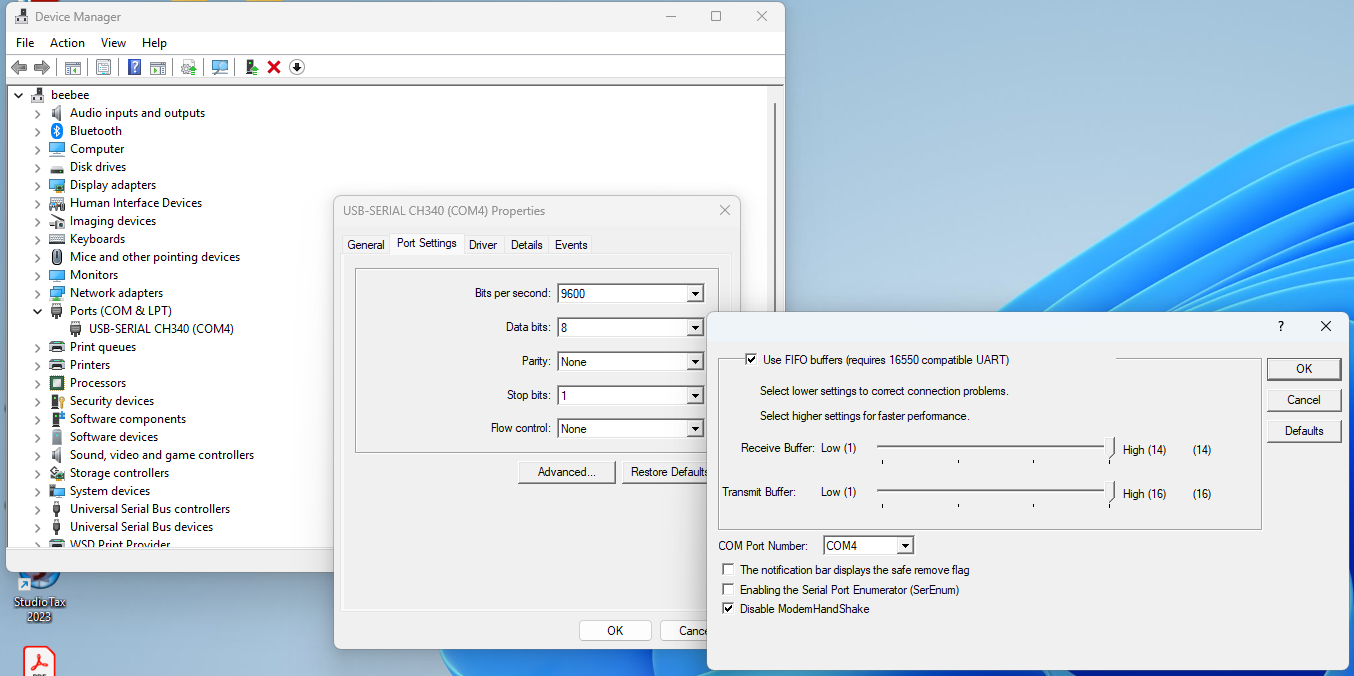
Connecting with CPWI over Mount-USB (MUSB)A direct, wired connection over USB is possible between the HBG3 and a PC running the CPWI software. This mode of operation is selected by sliding the (blue) MUSB switch of the HBG3 to the UP position, away from the circuit board.But MS-Windows sometimes makes this harder than it need be. Most HBG3 modules have a Silicon Labs cp210x USB-Serial chip onboard. These ones work fine without any fuss. No need to read further here. But some newer ones, mainly those with a USB-C connector instead of USB micro-B, have a CH34x USB-Serial chip onboard. Those are the ones that may need the tweak described below. This is because the CH340 device driver defaults to "ModemHandShake" mode, which causes the HBG3 to be reset when opened for access by CPWI. One determine that this is happening by watching the HBG3 OLED display, with the device doing a reset and briefly showing the QR-Code screen again, when attempting to connect from CPWI. i This mis-feature must be disabled for a MUSB connection to succeed. Go into the MS-Windows Device Manager, find the USB-SERIAL CH340 device there under Ports (COM & LPT), and go into the Port Settings, Advanced, and check the box for Disable ModemHandShake. Then click OK, and OK.. until back at the main Device Manager window. All should be good after making that change.
Linux systems don't have this issue, even hosting VirtualBox to run CPWI inside a MS-Windows virtual machine (VM) on the Linux system. |